 Kitebill
Overdue invoice tracker (automatic when past due)
Once you mark an invoice Sent, Kitebill treats it as overdue the day after the due date — no extra status to remember.
How overdue works here
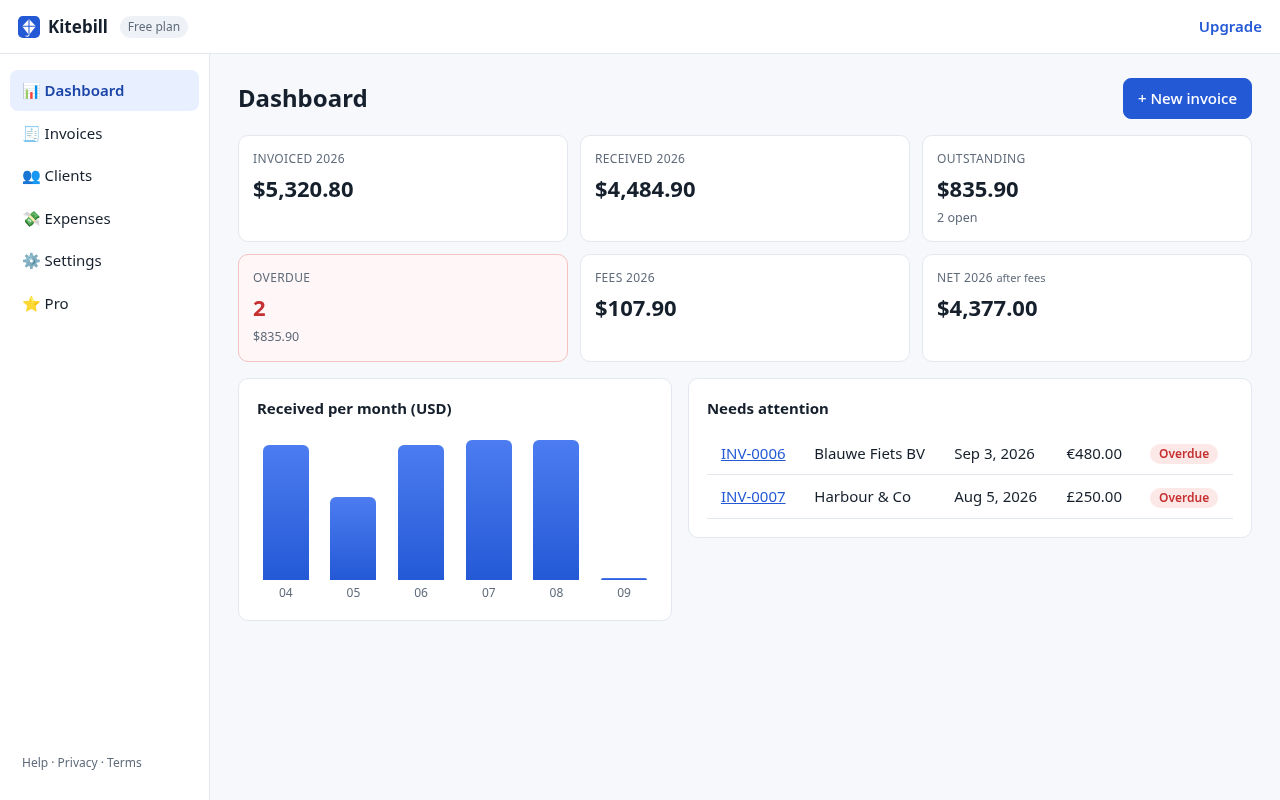
Invoices have three statuses you set: draft, sent, paid. Overdue is not a fourth button. If status is sent and the due date is before today, the app shows it as overdue on the invoice list, dashboard KPI, and the "open" table.
- Click Mark as sent when you actually emailed the PDF.
- Set a real due date (Net 7 / 14 / 30, or whatever you wrote on the invoice).
- When the client pays, Mark as paid and optionally record the amount received and fees.
What you see
| Place | What it shows |
|---|---|
| Dashboard KPI | Count of overdue invoices + total in your base currency (alert styling when > 0). |
| Open list | Overdue first, then other sent invoices, with due date and amount. |
| Invoices tab | Filter: all / draft / sent / overdue / paid. |
What this tracker does not do
- No automatic reminder emails. We do not have your client's inbox and we do not send mail on your behalf. Follow up yourself.
- No late-fee calculator. If your contract allows a late fee, add a line on a new invoice; we will not invent a penalty.
- No collections agency or legal chase.
- No cloud sync. Overdue is computed in this browser from dates you entered. Export a backup if you switch machines.
A practical chase sequence (you do this, not the app)
- Due date − 2 days: polite "just checking this is in the queue" if the client is usually slow.
- Due date + 1: forward the same PDF, ask if AP needs a PO or a different billing name.
- Due date + 7: phone or a short email; offer a payment link you already use (Wise/Payoneer), not a new surprise method.
- Still unpaid: pause new work. That decision is yours; the dashboard only shows the number.
Free vs Pro
Overdue tracking is free (within 3 clients / 10 invoices). Pro (US$29 once) is unlimited records, expenses, CSV export, logo — not a "unlock overdue" paywall.
Start
The generator prints one PDF (it does not remember overdue). For a tracker, open the app, create the invoice, Mark as sent, and keep the tab's data (or a backup).
Questions
Can I mark something overdue by hand?
You don't need to. Sent + past due date is overdue. If it is still a draft, it will not show as overdue even if the date passed — drafts are not billed yet.
Does overdue send the client an email?
No. Local-first means we cannot email them. You send the reminder.
What timezone is 'today'?
Your device's local date. Set due dates accordingly if you work across zones.